

Auto Keys
Tesla Key Replacement, Key Fob Programming & Smart Key Service
Tesla does not use a traditional cut key. It relies on a key card, a phone-as-key over Bluetooth, and an optional proximity fob, all paired through the car's touchscreen.

Tesla does not use a traditional metal key or a transponder blade you can cut. Instead, every Tesla relies on a key card you tap on the door pillar and center console, a phone-as-key that connects over Bluetooth, and an optional proximity key fob. There is no mechanical key blank, keyway, or chip to cut or clone.
Replacement key cards, phone keys, and fobs are added and removed through the car's own touchscreen by an authenticated owner, not by cutting or programming a blade. Because of this, Tesla key work is different from every other make. We can explain how the system works, how to pair or remove a key card, phone, or fob, and where to source genuine Tesla accessories, so you understand your options before you need them.
Tesla models we service
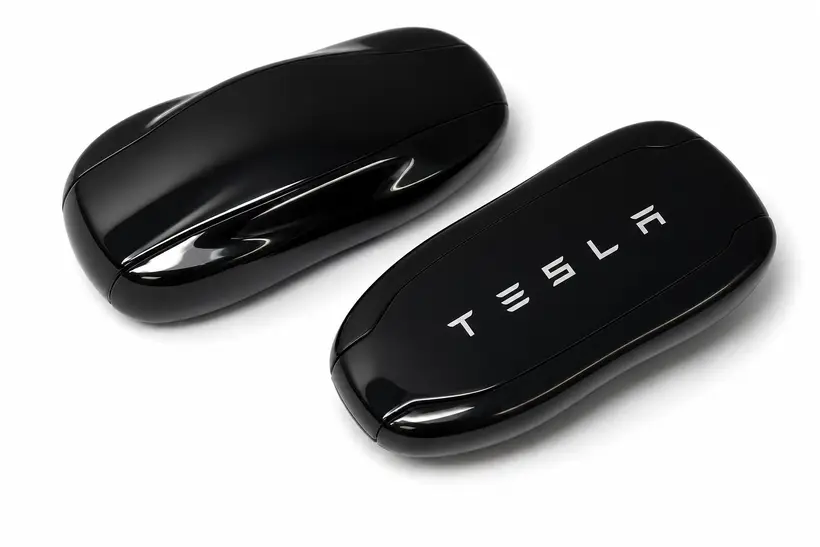
Tesla key types by generation
Tesla keys changed significantly from one era to the next. The right blank, chip, and programming path depend on the year, trim, and ignition type, which is why we ask for the details before selecting a key.
Key card (all current models)
The key card is a thin RFID card you tap on the driver-side door pillar to unlock and on the center console to enable driving. It is the baseline key for every Tesla and is paired through the touchscreen. There is nothing to cut or program in the locksmith sense.
Phone-as-key (Bluetooth)
The Tesla app turns your phone into a key over Bluetooth, locking, unlocking, and enabling driving as you approach. It is set up in the app and authorized through the touchscreen, and it is not a physical key we cut or clone.
Optional proximity key fob
Tesla offers an optional proximity key fob for owners who prefer a physical remote. Like the key card and phone key, it is paired through the car's touchscreen by an authenticated owner. There is still no transponder blade to cut.
Tesla key data by model
Verified blank, chip, and FCC references are marked accordingly. Where a value depends on trim, button count, or production date, confirm it from the original key, a VIN lookup, or a supplier catalog before cutting or ordering.
Data is drawn from professional locksmith key references. It is a starting point for identification, not a guarantee for your specific vehicle.
Tesla Model 3 Key Replacement
The Model 3 ships with key cards and supports phone-as-key, with an optional proximity fob available. All are paired through the touchscreen rather than cut or programmed like a traditional key.
| Year range | Key type | Ilco / keyway | Chip / system | FCC / OEM | Programming | Emergency / service key | Source confidence |
|---|---|---|---|---|---|---|---|
| All model years | Key card (RFID) | No mechanical blank; key card, not a cut key | RFID key card paired via touchscreen | No transponder key; confirm options from Tesla | Paired and removed through the car's touchscreen by an owner | No emergency blade; keep a backup key card | Confirm with original fob |
| All model years | Phone-as-key / optional proximity fob | No mechanical blank; phone key or optional fob | Bluetooth phone key or optional proximity fob | No transponder key; confirm options from Tesla | Set up in the Tesla app and authorized via touchscreen | No emergency blade; keep a backup key card | Confirm with original fob |
- •Tesla recommends keeping at least one backup key card in a safe place, since there is no cut key to fall back on.
Tesla Model Y Key Replacement
The Model Y uses the same key system as the Model 3: key cards, phone-as-key, and an optional proximity fob, all managed through the touchscreen.
| Year range | Key type | Ilco / keyway | Chip / system | FCC / OEM | Programming | Emergency / service key | Source confidence |
|---|---|---|---|---|---|---|---|
| All model years | Key card (RFID) | No mechanical blank; key card, not a cut key | RFID key card paired via touchscreen | No transponder key; confirm options from Tesla | Paired and removed through the car's touchscreen by an owner | No emergency blade; keep a backup key card | Confirm with original fob |
| All model years | Phone-as-key / optional proximity fob | No mechanical blank; phone key or optional fob | Bluetooth phone key or optional proximity fob | No transponder key; confirm options from Tesla | Set up in the Tesla app and authorized via touchscreen | No emergency blade; keep a backup key card | Confirm with original fob |
Tesla Model S / Model X Key Replacement
The Model S and Model X have historically included a proximity key fob along with the key card and phone-as-key. The exact fob style varies by year, and all keys are paired through the touchscreen.
| Year range | Key type | Ilco / keyway | Chip / system | FCC / OEM | Programming | Emergency / service key | Source confidence |
|---|---|---|---|---|---|---|---|
| All model years | Proximity key fob | No mechanical blank; proximity fob, not a cut key | Proximity fob paired via touchscreen | No transponder key; confirm fob style from Tesla by VIN | Paired and removed through the car's touchscreen by an owner | No emergency blade; keep a backup key card | Needs VIN confirmation |
| All model years | Key card / phone-as-key | No mechanical blank; key card or phone key | RFID key card or Bluetooth phone key | No transponder key; confirm options from Tesla | Set up via app and authorized through the touchscreen | No emergency blade; keep a backup key card | Confirm with original fob |
- •Model S and Model X fob styles have changed across generations; confirm the correct accessory for your year and VIN with Tesla.
Common Tesla key problems
- •A lost key card with no spare, which leaves the owner relying on the phone key until a replacement card is added.
- •Phone-as-key dropping out when the phone's Bluetooth is off, the battery is dead, or app permissions change.
- •Owners expecting a traditional cut key and being surprised there is no blade or transponder to copy.
- •An optional proximity fob battery dying, mistaken for a failed fob.
- •Confusion over how to add or remove a key card, phone, or fob through the touchscreen menu.
Tesla programming notes
- •Tesla keys are not cut or programmed like traditional keys; key cards, phone keys, and fobs are paired through the car's touchscreen by an authenticated owner.
- •There is no transponder blank or keyway to clone, so a Tesla cannot be rekeyed the way a conventional vehicle can.
- •Keep at least one backup key card in a safe place, since there is no mechanical key to fall back on if a phone or fob fails.
- •Replacement key cards and fobs should be genuine Tesla accessories paired on the vehicle; confirm the correct part for your model and year with Tesla.
What to have ready before service
Sending these details when you call (561) 839-9919 lets us bring the right blank and programming tools on the first trip so your Tesla job is done in one visit.
Real Tesla locksmith scenarios
These are the Tesla situations we actually get called for in Palm Beach County, with the technician's read on each one: what is happening, whether a mobile locksmith can solve it, and what the job typically involves. They are educational examples, not testimonials.
Lost the only key card with no spare
Your single key card is gone and you are worried about getting locked out, since there is no metal key to fall back on.
Likely causes
- •The only key card was lost or left behind.
- •No backup card or phone key was ever set up.
Programming
Done on the car's touchscreen, not by outside cutting
Ignition repair
Not applicable; Tesla has no ignition cylinder
Key replacement
Source a genuine replacement key card
Complexity
Routine
Common repair options
- •Set up the phone-as-key so you can keep driving right away.
- •Add a new genuine Tesla key card through the touchscreen and keep it as a spare.
Can a locksmith help? Yes, in an advisory way. We can explain how to keep driving on the phone key and how to add a new genuine key card through the touchscreen. The pairing itself is done on the car by an authenticated owner, not by cutting a key.
Phone-as-key stopped working
Your Tesla no longer unlocks or lets you drive as you approach with your phone.
Likely causes
- •Phone Bluetooth turned off or the phone battery is dead.
- •Tesla app permissions or background access changed after an update.
- •The phone key was removed or the app was logged out.
Programming
Re-enabled in the Tesla app and on the touchscreen
Ignition repair
Not applicable
Key replacement
Not required; use the key card meanwhile
Complexity
Routine
Common repair options
- •Turn Bluetooth back on and reauthorize the phone in the app.
- •Fall back to the key card until the phone key is working again.
Can a locksmith help? Yes, as guidance. We can walk you through restoring the phone key and why the key card is the reliable backup. There is nothing to cut or program in the locksmith sense.
Optional proximity fob battery is dead
The proximity fob no longer unlocks the car or enables driving, and it seems unresponsive.
Likely causes
- •A flat coin battery in the fob, mistaken for a failed fob.
- •A fob left transmitting near other devices.
Programming
Not required for a battery change
Ignition repair
Not applicable
Key replacement
Not required if the fob is healthy
Complexity
Routine
Common repair options
- •Replace the fob coin battery and retest.
- •Use the key card or phone key while the fob is down.
Can a locksmith help? Yes. A dead fob battery is a simple swap, and we can confirm the fob still works on the car afterward. Use the key card or phone key in the meantime.
Expecting a traditional cut key for a used Tesla
You bought a used Tesla and want a spare metal key cut, but there is no keyway or blade to copy.
Likely causes
- •Tesla uses key cards, phone keys, and an optional fob instead of a cut key.
- •The seller may not have handed over both key cards.
Programming
Done on the car by an authenticated owner
Ignition repair
Not applicable
Key replacement
Add a genuine key card or fob as a backup
Complexity
Routine
Common repair options
- •Add a second genuine key card so you have a spare.
- •Set up the phone key for everyday use.
Can a locksmith help? Yes, as guidance. We explain that there is nothing to cut and help you set up a backup key card or fob through the touchscreen.
Used Tesla handed over with only one key card
The previous owner gave you a single key card, and you want to be sure no other keys can still access the car.
Likely causes
- •Extra key cards, phone keys, or fobs may still be paired from before.
- •Only one card was passed along at the sale.
Programming
Keys are reviewed and removed on the touchscreen
Ignition repair
Not applicable
Key replacement
Add a backup key card after clearing old keys
Complexity
Routine
Common repair options
- •Remove any unknown paired keys through the car's key menu.
- •Add a fresh genuine key card and keep it as a spare.
Can a locksmith help? Yes, as guidance. We explain how an owner reviews and removes old keys through the touchscreen so only your keys have access, and how to add a backup card.
Key card not reading on the door pillar or console
Tapping the key card on the pillar does not unlock the car, or it will not enable driving from the console.
Likely causes
- •The card is being tapped at the wrong spot or too quickly.
- •A damaged or bent key card with a failing RFID antenna.
- •A phone case or wallet shielding the card.
Programming
A replacement card is paired on the touchscreen
Ignition repair
Not applicable
Key replacement
Replace a damaged key card with a genuine one
Complexity
Routine
Common repair options
- •Retry the card at the exact pillar and console read points.
- •Add and use a new genuine key card if the old one is damaged.
Can a locksmith help? Yes, as guidance. We help you find the correct read points and confirm whether the card itself has failed so you can replace it with a genuine one.
Locked out with a dead 12V battery
The car will not respond to the key card or phone key, and the doors and screen seem completely unpowered.
Likely causes
- •A discharged 12V battery so the car cannot read any key.
- •A vehicle left unused for a long time.
Programming
Not applicable to this fault
Ignition repair
Not applicable
Key replacement
Not required; the keys are likely fine
Complexity
Moderate
Common repair options
- •Follow Tesla's documented steps to apply external 12V power for access.
- •Have the 12V battery tested and replaced if it is failing.
Can a locksmith help? Limited. This is a vehicle power issue rather than a key issue, so we point you to Tesla's manual external power access steps and roadside support. There is no key to cut that would solve it.
Phone key works but you want a physical backup
You rely only on the phone-as-key and want a backup in case your phone is lost or dead.
Likely causes
- •No key card or fob is currently set up as a backup.
- •A single phone key is the only access method.
Programming
Backup key is paired through the touchscreen
Ignition repair
Not applicable
Key replacement
Add a genuine key card or optional fob
Complexity
Routine
Common repair options
- •Add a genuine key card and keep it in your wallet.
- •Add the optional proximity fob if you prefer a physical remote.
Can a locksmith help? Yes, as guidance. We explain your backup options and help you decide between a key card and the optional proximity fob, then how to pair it on the car.
Both key cards lost while traveling
You are away from home and both key cards are gone, leaving only the phone key.
Likely causes
- •Both cards lost or stolen at the same time.
- •No proximity fob set up as an extra backup.
Programming
New cards are paired on the car
Ignition repair
Not applicable
Key replacement
Source genuine replacement key cards
Complexity
Routine
Common repair options
- •Keep using the phone key while you arrange replacement cards.
- •Add new genuine key cards and remove the lost ones from the car.
Can a locksmith help? Yes, as guidance. As long as the phone key still works you can keep driving, and we explain how to source and pair genuine replacement cards through the touchscreen.
New phone, phone key will not transfer
You switched phones and the new phone will not act as a key for the Tesla.
Likely causes
- •The Tesla app on the new phone is not yet authorized on the car.
- •Bluetooth or background permissions are not granted on the new phone.
Programming
Authorized on the touchscreen with a key card present
Ignition repair
Not applicable
Key replacement
Not required; use the key card to authorize
Complexity
Routine
Common repair options
- •Install the app, sign in, and approve the new phone using a key card.
- •Grant Bluetooth and background access so the phone key stays connected.
Can a locksmith help? Yes, as guidance. We walk you through reauthorizing the phone key with your key card present, which is how the car approves a new phone.
Selling a Tesla and removing personal keys
You are handing over the car and want to make sure your phone key and any extra keys no longer have access.
Likely causes
- •Your phone key and cards remain paired until removed.
- •Extra keys may still be on the car's key list.
Programming
Keys are removed on the touchscreen
Ignition repair
Not applicable
Key replacement
Not required; this is key removal
Complexity
Routine
Common repair options
- •Remove your phone key and any personal cards from the car's key menu.
- •Confirm the buyer adds their own key card before they drive off.
Can a locksmith help? Yes, as guidance. We explain how an owner removes all personal keys through the touchscreen before transfer so the buyer starts clean.
Tesla Key & Fob FAQs
Can you cut a key for my Tesla?
No. Tesla does not use a mechanical cut key or a transponder blade. It uses a key card, a phone-as-key over Bluetooth, and an optional proximity fob, so there is nothing to cut.
How does a Tesla key work?
You tap a key card on the door pillar and console, or use the Tesla app on your phone as a Bluetooth key. Some models also include a proximity fob. All of these are paired through the car's touchscreen.
I lost my Tesla key card. What do I do?
If you still have the phone key or another key card, you can keep driving and add a new key card through the touchscreen. Source a genuine replacement key card from Tesla and pair it on the vehicle.
Can you program a replacement Tesla key card or fob?
Tesla key cards, phone keys, and fobs are added and removed through the car's own touchscreen by an authenticated owner, not by outside programming. We can walk you through how the system works.
Do I need to keep a spare Tesla key card?
Yes. Because there is no mechanical key to fall back on, Tesla recommends keeping at least one backup key card in a safe place in case a phone or fob is unavailable.
Why did my Tesla phone key stop working?
Phone-as-key relies on Bluetooth. If your phone's Bluetooth is off, the battery is dead, or app permissions changed, the phone key can drop out. Your key card is the reliable backup.
Does my Tesla have a proximity fob?
Model S and Model X have typically included a proximity fob, while Model 3 and Model Y offer one as an option. The exact fob style varies by year, so confirm the correct accessory with Tesla.
Can a Tesla be rekeyed like a regular car?
No. There is no lock cylinder or transponder blank to rekey. Access is managed entirely through key cards, phone keys, and fobs paired on the touchscreen.
Where do I get a replacement Tesla key card or fob?
Replacement key cards and fobs should be genuine Tesla accessories. We can explain your options, but the new key is paired through your vehicle's touchscreen.
Do you service Tesla vehicles at all?
We can explain how the Tesla key system works and help you understand pairing a key card, phone key, or fob. We do not cut a mechanical transponder key, because Tesla does not use one.
Other makes we cut & program keys for
Understand your Tesla key before you call
Plain-English guides from our locksmiths on how Tesla keys, fobs, and immobilizers actually work, so you know what you are dealing with.
Tesla keys near you
We bring Tesla key cutting and programming to your door across Palm Beach County.
Locked Out? We're on the Way.
Don't wait around. Our mobile technicians are stationed throughout West Palm Beach ready to dispatch to your location immediately.